
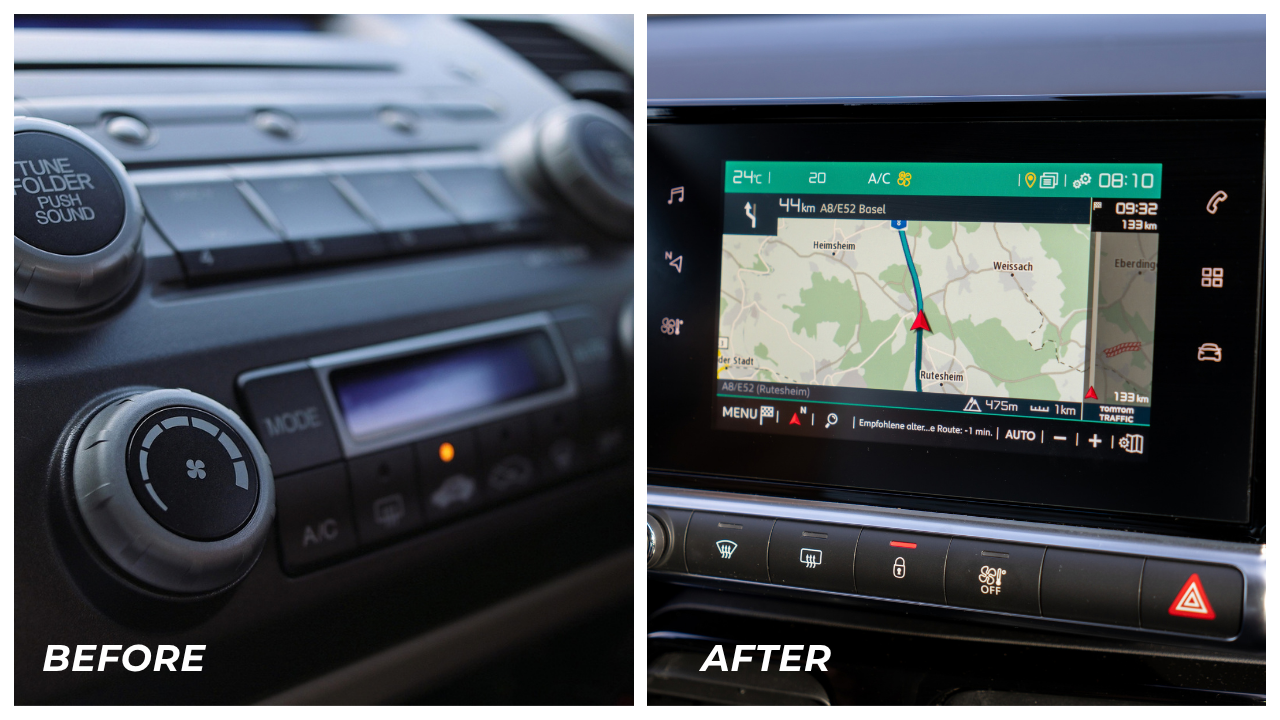
Quick answer: an in-dash DVD player (also called a multimedia head unit) replaces your factory stereo with a touchscreen system that plays DVDs, streams Bluetooth audio, mirrors your phone through Apple CarPlay or Android Auto, and often adds GPS navigation and backup camera support, all from one unit that fits into your dashboard.
If you drive around Idaho Falls or anywhere in southeast Idaho, you already know the drill. Long stretches of highway toward Pocatello, Rexburg, or over the pass to Jackson Hole. Kids in the back seat asking “are we there yet” non-stop. A factory stereo that still uses an aux cord because it was built before Bluetooth existed that sounds grainy. An in-dash DVD player solves a lot of that in one upgrade, and this guide walks through exactly what these units do, how to pick the right one, and what installation actually involves.
What Actually Is an In-Dash DVD Player?
An in-dash DVD player is a head unit, meaning the central control panel for your car’s audio and video, that includes a DVD drive along with modern connectivity features. Manufacturers like Kenwood, Pioneer, Alpine, and Sony build these as either single-DIN or double-DIN units, which refers to the physical size of the opening in your dashboard.
Here is what separates a modern in-dash DVD player from an old-school car stereo:
- Touchscreen control instead of knobs and buttons for every function
- DVD and CD playback built into the unit itself
- Bluetooth streaming for music and hands-free calling
- Apple CarPlay and Android Auto support, which mirrors your phone’s navigation, music apps, and messages onto the screen
- Backup camera inputs so you can add a rear camera without buying a separate screen–the most essential feature if you ask us
- GPS navigation on many models, useful in rural spots when up in Teton or driving by the Sawtooths when cell signal isn’t reliable
- Steering wheel control retention, so you keep the buttons your vehicle came with
Not every unit includes every feature. Entry-level models focus on Bluetooth and USB playback, while flagship units from Pioneer or Kenwood add navigation, HD radio, and multiple camera inputs for front, rear, and side views.
Why Idaho Falls Drivers Still Want a DVD Player in 2026
It’s a fair question. Streaming has replaced physical media almost everywhere else, so why does a DVD drive still matter?
A few real reasons this remains a popular upgrade:
- Rural cell coverage. Highway 20 between Idaho Falls and West Yellowstone, and long stretches toward the Wyoming border, still have dead zones. A DVD collection doesn’t buffer or drop out.
- Older vehicles without modern infotainment. Trucks and SUVs from the 2000s and early 2010s often still run on factory head units that lack Bluetooth entirely. A DVD-capable unit modernizes the whole cabin.
- Family road trips. Idaho Falls families driving to Yellowstone, Grand Teton, or south to Utah rely on rear entertainment to keep long drives manageable.
- Resale flexibility. Owners who already have a DVD library don’t want to abandon it just because the industry has moved toward streaming.
Why Do In-Dash DVD Players Lock Out Video While Driving? (FAQ)
This is one of the most common questions customers ask when they see a demo unit running in the showroom. In-dash DVD players use a parking brake sensor wired into the installation. When the vehicle is in motion, the screen restricts to audio-only mode or navigation, and full video only plays when the parking brake is engaged.
This isn’t just an industry habit. The National Highway Traffic Safety Administration (NHTSA), the federal agency that sets driver distraction standards, classifies certain screen functions as “per se lock outs,” meaning they must be disabled while a vehicle is in motion. NHTSA’s guidelines specifically list “displaying video not related to driving” as one of the tasks considered inherently unsafe for a driver to view while behind the wheel. That federal guidance is the reason every in-dash DVD player on the market locks out video until the parking brake is engaged, while still allowing passengers to use the video features once the vehicle is parked, or through a rear-seat monitor while driving.
This safety lockout is one reason professional installation matters. A poorly wired unit can either fail to lock out video correctly or, just as commonly, lock out features that should still work for passengers.
Single-DIN vs. Double-DIN: Which One Fits Your Vehicle?
Before choosing a unit, you need to know what your dashboard opening supports.
- Single-DIN units are about 2 inches tall and fit older vehicles or trucks with a narrow dash opening. Some single-DIN units include a motorized flip-out or slide-out touchscreen to compensate for the smaller frame.
- Double-DIN units are roughly 4 inches tall and give you a larger, fixed touchscreen, typically 6.2 to 9 inches. Most modern vehicles built in the last 15 years have double-DIN openings, or can be adapted to one with a dash kit.
A knowledgeable installer checks your make, model, and year before recommending a unit, since dash kits, wiring harnesses, and antenna adapters vary significantly between vehicles.
What to Look for When Choosing a Head Unit
Not every driver needs every feature, so start with how you actually use your vehicle.
- Daily commuters benefit most from Apple CarPlay or Android Auto, since it puts Google Maps, Spotify, and text messages on the screen without needing the DVD function at all.
- Families with road trip habits should prioritize a DVD/media player with rear-seat monitor compatibility and multiple video inputs.
- Work trucks and older vehicles often need a unit with strong Bluetooth calling quality and a simple interface, since the driver is using it constantly.
- Anyone adding a backup camera should confirm the head unit has a dedicated camera input, since retrofitting one later can mean redoing part of the install.
Brands matter here too. Kenwood and Pioneer both build well-regarded in-dash DVD players with strong touchscreen responsiveness and wide compatibility. Alpine and Sony offer competitive options, particularly for drivers who want tighter integration with existing amplifiers or subwoofers.
Why Professional Installation Matters More Than People Expect
A head unit swap looks simple in a YouTube video, but modern vehicles run dozens of interconnected electrical systems. Steering wheel controls, factory backup cameras, parking sensors, and even climate control displays can all run through the same wiring harness as the stereo. Get it wrong, and you can lose more than just your radio.
This is exactly why the mobile electronics industry built a national certification standard. Ron Freeman, president of AAMP of America, put it plainly when discussing the value of proper training for installation staff: “MECP is a requirement of my sales staff.”
MECP stands for Mobile Electronics Certified Professional, and it’s the only nationally recognized certification for technicians who install aftermarket car audio, video, and security systems. A certified installer understands how to:
- Identify the correct wiring harness and dash kit for your specific vehicle
- Retain steering wheel controls and factory safety features
- Properly ground the system to prevent electrical noise or interference
- Wire the parking brake sensor correctly so video lockout functions as intended
- Diagnose and fix issues without damaging factory wiring
At Limitless Electronics, this is the standard the team holds itself to on every in-dash DVD player installation, whether it’s a straightforward Bluetooth upgrade or a full multimedia system with navigation and multiple camera inputs.
Installation Process: What to Expect
Here is a general outline of what happens during a professional in-dash DVD player installation:
- Vehicle assessment. The installer identifies your dash size, existing wiring, and any factory features that need to be retained.
- Parts selection. This includes the head unit itself, a dash kit sized for your vehicle, a wiring harness adapter, and an antenna adapter if needed.
- Removal of the factory stereo. The dashboard trim is carefully removed to access the existing unit.
- Wiring and mounting. The new unit is wired into the harness adapter, grounded properly, and secured into the dash kit.
- Feature configuration. Steering wheel controls, backup camera, Bluetooth pairing, and any navigation settings are configured and tested.
- Final walkthrough. A good installer walks you through the new interface before you drive off, so you’re not learning the touchscreen menu at a stoplight.
Frequently Asked Questions
Can I keep my steering wheel controls after installing a new head unit?
In most cases, yes. This requires a steering wheel control interface module, which is typically included as part of a proper installation. It’s worth confirming with your installer before the work begins.
Will an in-dash DVD player work with my backup camera?
Most modern units include a dedicated camera input. If your vehicle already has a factory backup camera, the installer will confirm compatibility or recommend a camera that pairs cleanly with the new unit.
Do in-dash DVD players still get AM/FM radio?
Yes. Nearly all in-dash DVD players include AM/FM radio along with DVD, CD, Bluetooth, and USB playback. Some flagship models also add HD Radio or satellite radio compatibility.
How long does installation take?
A straightforward head unit swap typically takes a few hours. More complex installs involving navigation, multiple cameras, or rear-seat monitors take longer. Your technician can give you a firm estimate once they’ve assessed your vehicle.
Does installing an aftermarket unit void my vehicle’s warranty?
Aftermarket electronics installation is generally not covered under discussions of warranty avoidance for unrelated systems, but it’s worth checking your specific manufacturer’s warranty terms if you’re concerned, particularly for newer vehicles under factory warranty.
What’s the difference between a head unit and an in-dash DVD player?
“Head unit” is the broader term for any central stereo control system. An in-dash DVD player is a specific type of head unit that includes a built-in DVD drive along with the standard audio and connectivity features.